CELCOM MOBILE BROADBAND RATING

2
Dear all;

Recently I did a test to rate the quality of a Celcom mobile broadband internet connection. It is an independent benchmarking available at pingtest.net.
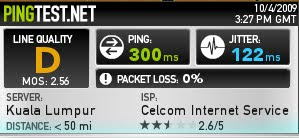
The line quality was measured by determining PING time, jitters and packet loss percentage. However bear in mind that this is a general assessment of the Celcom Broadband quality and it is not final. The result may be different if different server location were selected. So to say that the line is bad, in my opinion is a bit premature. However to say that the line is excellent is way of the mark.

Since Celcom Mobile Broadband connection was transmitted using a cellular transmission, we cannot expect it to be performing on par with the wired/fixed broadband connection. Wireless transmission to some extent, will suffer data loss and signal inconsistency. So if you want a more stable and consistent connection, choose a fixed line broadband. Remember broadband connection over GSM signal is not intended to be a direct replacement for your wired/fixed line broadband. It only act as secondary connection or additional connection whenever you are on the go.

Have you ever heard of those fella who are running their internet based business which most of the time require a stable constant internet connection, and to my surprise some of them use a celullar based broadband (celcom) as a main internet connection, you know how I feel pitty for them. One more thing, I don't know why Celcom advertise their connection as a medium for online gaming. The PING result is quite high and it is not suitable at all for online gaming.

Overall, a D for Celcom mobile broadband.. to say the result is suck, wait until you see the result of the other mobile broadband provider in this country. A complete laughing stock of the millennium!!


--
Andrey Arshavin The Legend
amrymr.blogspot.com


NEW UPDATE: VLBDC ERROR SOLUTION

0
Good day..

New updates on this unintentional rerouting to vlbdc.com website.
1. its not virus or a malware
2. its a network error
3. only effect Celcom Mobile Broadband PREPAID customers (so far there is no such same report for postpaid broadband)
4. usually happen during peak hours..

how to solve?
openDNS!!! remember these number [Preferred DNS:208.67.222.222 and Alternate DNS:208.67.220.220]. Tested before and it works!!

For XP users: Go to control panel> network Connections> then right click on your existing connection> click properties> networking> and double click on TCP/IP.

For Vista users:
Go to control panel> View network status and tasks> View status> Properties> Internet Protocol Version 4 (TCP/IPv4), then click the Properties button> Click the radio button Use the following DNS server addresses: and type in addresses in the Preferred DNS server and Alternate DNS server fields.


--
Andrey Arshavin The Legend
amrymr.blogspot.com


ERROR 680: NO DIAL TONE

0
For Celcom Mobile Broadband subscriber, sometimes you may face this kind of error.

Root Problem:
1. Network congestion - computer failed to do successful dial up operation due to the unavailability or failure to transmit data packets.
2. Hardware problem - Modem not connected properly or the USB contact point damaged (for USB modem).
3. For For Broadband package subscribed together with a voice plan, in some remote cases voice mail system may interrupt with the computer dialing system.

Solutions:
For network error, just contact your service provider. If the error is not caused by network congestion, you can try to do these steps:

Go to control Panel>>Phone and Modem Options>>Modem>>(highlight your modem)>>properties>Modem tab and unchecked wait for dial tone before dialing.

In some remote cases, receiving voice mail while the computer is attempting to execute dial up networking may confuse your computer into thinking that there is no valid dial tone (this is because some voice mail system keep sending a beeping signal which will wrongly interpreted by the computer). Depending on the carrier you subscribed, try to check that your computer setting is set to the correct local country so that your computer is listening to the correct dialing tone.

Start>Control Panel>Printers and Other Hardware>Phone and Modem Options>Dialing Rules>Edit>General tab>make sure that the correct country is listed under Country/region.

--
Andrey Arshavin The Legend
amrymr.blogspot.com

VLBDC error anybody?!!

5
This morning I received an email with an error which I never heard/know before. Anybody out there who were "special" enough to face this problem? Frankly speaking, since I subscribed to Celcom Mobile Broadband, I didn't encounter any problem with their service (except in a few occasions where the error 619 demon 'surface' and caused my connection to transform from BROADBAND service to SUPER SNAIL BAND).

Scenario:
A subscriber try to do connections to the internet, and.....the browser will automatically directed to this webpage www.vlbdc.com. Thinking that his homepage maybe accidentally changed, he tried to open another website. To this subscriber horror, it seems that he cannot even open another page because every time the subscriber typed a web address and hit enter, automatically it will be directed back to this haunted www.vlbdc.com

Solutions:
Since I never face this problem before, I don't have any concrete answer to this problem.. Generally, if the subscriber are able to open the vlbdc.com site, that means the internet connection is OK. The most probable answer is that the subscriber computer was invaded by a virus/malware. I did try to open the website myself. Here is the screenshot:
A quick WHOIS of this website:
This website is registered under a company located at Shanghai China (75.125.118.191). So, if its so happen that your computer was invaded by viruses/malware, then you know exactly what you need to do. Update your Antivirus and make sure your firewall is activated. Don`t forget to delete all your browsers old temporary internet files and cookies. Go to my computer, right click on drive C and go to disk clean up. Clear everything. Then repeat the same procedure to your other drive. Reinstall or better upgrade your dialing software and modem driver to the latest version. If still failed, try to do System restore. If everything has been done but you still get the same error, then maybe its time for you to reformat your computer.

P/s: If you happen to be the victim of this vlbdc.com error, please give me the full detail so that we can find the best solution for it.TQ


MOBILE CONNECTION IS NOT POSSIBLE

17
Its almost 2 months since the last time I updated this blog [ I took a long leave :) ].

Last weekend I have a training/meeting with ZTE personnel. For those who does not know yet, ZTE currently is the main modem distributor for Celcom Mobile Broadband. They supply ZTE K3565-Z (Same spec with Huawei or Vodafone K3565). Same product, but from two different distributors. Both modem are using Vodafone Mobile Connect Lite as a dialling software and both a made in China products ;)..

(You think that this is a Vodafone product??!! Naahh..its ZTE or HuaWei. pls dont be fooled by the logo hehe )

Based on the training given, it seems that among the most common problem faced by those who are using this modem on a Celcom Mobile Broadband network is they frequently face this error "Mobile connection is not possible". Due to my laziness, I just copy and paste it here for us to share the available solutions:

Ladies and gentlemen, familiar with this error? If your answer is a definite yess, then proceed with your reading..

Reasons
Known reasons are 2 at present, and all the possibilities below due to the Windows OS problems or the compatibility.
1. As the pop-up window shown, other programs really occupied the device.
2. Network problems.
3. Devices Driver problems.

Way to fix
For 1, reboot the computer and try again. If no effect, uninstall VMC and install it again.
For 2, wait for a moment and try to connect again. If no effect, move to another place and try again.
For 3, right click “My Computer” and select “manage” – “Device Manager”, then check all the ZTE devices. Please ensure all the red selected ZTE devices works fine.
Please make sure all the ports and comm related to your modem is configured correctly

If not, install the device driver manually.

If you cannot install the driver manually, right click the device and select uninstall then scan the new device. The driver then can be installed properly.

The default path for the drivers of K3565-Z below (assuming that you installed your software in drive C):

C:\Program Files\Vodafone\Vodafone Mobile Connect\Driver\pccard\xp\ZTE3520


About Me

My photo
I blogged from an iOS device.. :) no preferred subjects. A lil' bit of technology, a lil' bit of amateur photography.. But mostly it all centered around my daily life.

Search This Blog

Visitors

Followers